Sweeping the Ocean Back

The short answer: an absurdist AI video prompt keeps the camera locked, the character fiercely serious and the music out, so the impossible task is the joke. Our 16-second film of Riya sweeping the ocean back with a push broom was made this way in Seedance 2.5 on Magnific, using a character sheet and a five-panel storyboard. The full prompt is below.
Deadpan humour is hard to get from an AI video model. Left alone, it adds music, smiles and a cinematic camera move, and the joke disappears. An absurdist AI video prompt has to hold the camera still, keep the character serious and let the sound of the effort do the work.
We at Artea made this 16-second film for Riya's Instagram: she fights incoming waves with a wooden push broom, soaked and furious, as if the ocean might actually give up. It was made with Seedream 5 Pro and Seedance 2.5 on Magnific. This post gives you the character sheet prompt, the storyboard and the full video prompt.
The tools we used
Seedream 5 Pro on Magnific: the character sheet
Seedream 5 Pro is an AI image model. We gave it three photos of Riya and one outfit photo, and it made a turnaround sheet of the same woman from the front, side and back.
Why it matters: the video model copies her face and clothes from this sheet in every shot, which is what keeps her looking like the same person after each cut.
A storyboard: the shot layout
A storyboard is a row of rough frames that shows what the camera sees in each shot and for how long.
Why it matters: attached as a reference, it tells the video model where to put the camera, so the wide shots match from cut to cut.
Seedance 2.5 on Magnific: the video
Seedance 2.5 is an AI video model that accepts reference images and a multi-shot prompt, and it adds sound effects. The film was generated with it in one run.
Why it matters: one generation means one consistent look, light and grade, instead of separate clips that need matching in an edit.
All three are available on Magnific, which is where we made the whole film.
The character sheet and its prompt
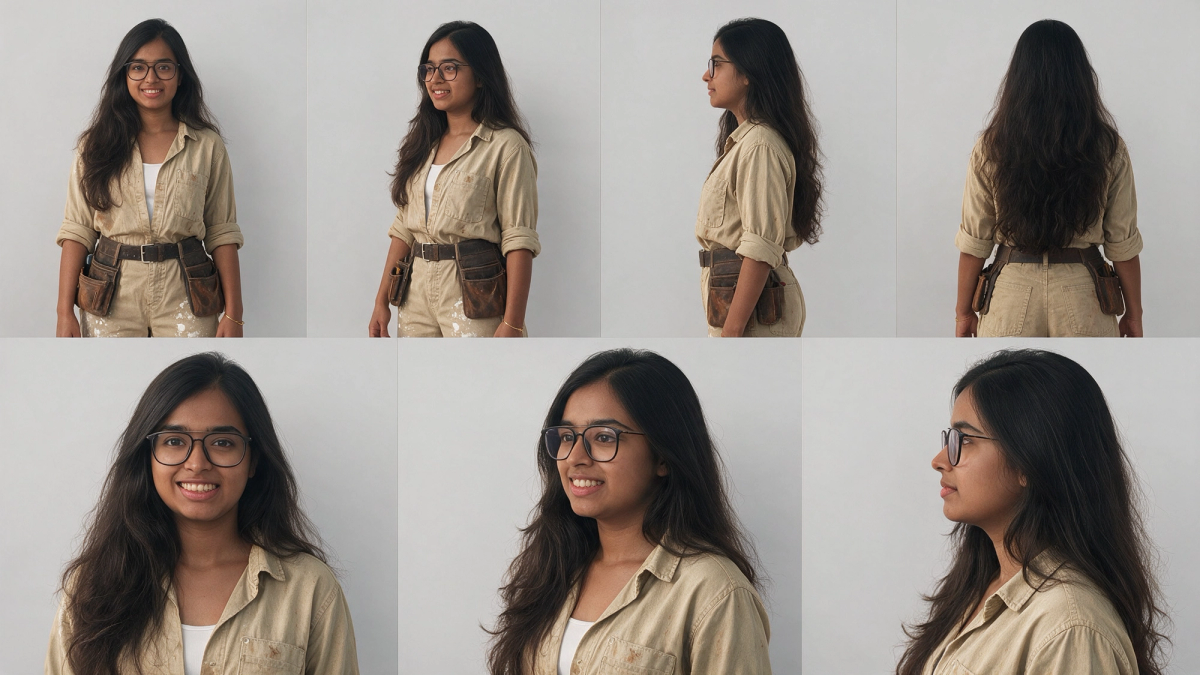
This is the prompt we ran in Seedream 5 Pro. Images 1 to 3 were photos of Riya and image 4 was an outfit reference. Swap in photos of your own character and your own outfit idea.
Create a character reference sheet.
IDENTITY - Images 1, 2 and 3 are the SAME real woman. Copy her face exactly as it appears in these photos: same face shape, eyes, nose, lips, smile, teeth, skin tone, eyebrows and proportions. Do NOT beautify, slim, age, lighten skin or change her features. Her face must look identical in every panel.
- Young Indian woman, early-to-mid 20s, round soft face, warm medium-brown skin
- Black thin rectangular eyeglasses (always on)
- Very long, voluminous, wavy dark-brown hair, middle parting, worn loose past the waist
- Small gold bangle on her right wrist
OUTFIT - Image 4 is for clothing ONLY. Ignore that model's face, hair and body entirely.
- Faded khaki/beige long-sleeve button-up work shirt, sleeves rolled to forearms, open collar with white tank top underneath, light brown dirt stains
- Matching khaki work trousers with white paint splatter
- Dark brown leather belt with brown leather tool pouches on both hips
- Dark worn knee pads
LAYOUT - plain light-grey studio background, soft even lighting, same scale in every view:
Top row: full-body turnaround, standing relaxed with arms at her sides - front, 3/4 front, side profile, back.
Bottom row: head-and-shoulders close-ups - front, 3/4, profile - all with the same face as the reference photos.
STYLE: photorealistic, natural skin texture, true-to-life, clean reference sheet with thin divider lines.
Negative prompt:
different face, face from image 4, ponytail, no glasses, lighter skin, slimmer face, beautified features, changed nose, changed smile, cartoon, inconsistent identity across panels
The storyboard
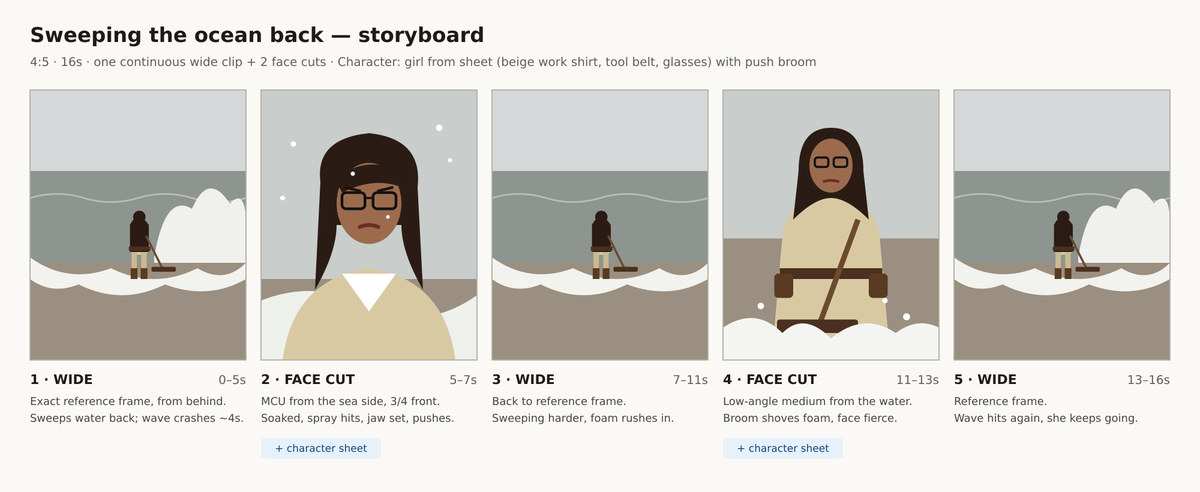
The storyboard is a simple five-panel layout: three identical wide shots from behind, with two close-ups from the sea side in between. It shows where each wave hits, so the prompt can time them.
The full absurdist AI video prompt
Attach the character sheet and the storyboard, then paste this into Seedance 2.5.
4:5 vertical, 16 seconds, photoreal, 35mm film grain, cold desaturated grey-green palette, overcast flat light, dry absurdist tone. No text, no titles, no logos, no music.
Character (match reference image exactly): young Indian woman, mid-20s, long loose wavy dark-brown hair, black thin-rimmed rectangular glasses, thin gold bracelet on right wrist. Worn beige/khaki button-up work shirt, sleeves rolled to the elbows, open collar over a white tank top; matching beige work trousers with white paint splatters, soaked dark at the shins; worn dark-brown leather tool belt with two heavy pouches; dark-brown leather work boots standing in shallow water.
Prop: long-handled wooden push broom with a wide wooden head.
Energy (applies to every shot): she is working HARD - fiercely determined, as if she can actually push the ocean back. Fast, forceful strokes shoving the incoming water and foam back toward the sea, whole body driving each push, knees bent in a wide braced stance, boots planted in the wet sand. Clothes and hair soaked and heavy, wet strands stuck to her face, water droplets on her glasses, breathing hard. Jaw set, brows furrowed. Not smiling. Never slow, never casual.
Setting & light (identical in every shot): grey overcast beach, flat white-grey sky, choppy grey-green sea, waves rolling in and washing white foam up the wet sand around her boots, cold wind.
Shot 1 (0-5s): Static locked-off wide shot from behind her, at the waterline, horizon in the upper third. She shoves the incoming foam back toward the sea with fast hard broom strokes. At 4s a big wave crashes right in front of her, white spray exploding over her - she braces and keeps sweeping. No camera movement.
Shot 2 (5-7s): Cut to medium close-up from the sea side, three-quarter front angle at eye level. Her face clearly visible - drenched, sea spray hitting her face and glasses, wet hair plastered to her cheeks, jaw clenched, eyes fierce. Shoulders driving the broom stroke toward camera. Static camera.
Shot 3 (7-11s): Cut back to the exact same static wide shot as Shot 1. She sweeps even harder as fresh foam rushes in around her boots, pushing it back again and again.
Shot 4 (11-13s): Cut to low-angle medium shot from the water, facing her. Foam surges toward camera, she drives the broom head straight into it with both hands gripping tight, forearms tense, tool belt pouches swinging, face and glasses visible, furious focus. Static camera.
Shot 5 (13-16s): Cut back to the exact same static wide shot as Shot 1. Another wave crashes into her, spray everywhere - she doesn't stop, keeps shoving the water back until the end.
Sound: heavy crashing waves, hissing foam, cold wind, wet broom scraping on sand, her hard breathing.
Why one wide shot three times? Returning to the exact same locked wide frame between close-ups gives the film a rhythm and makes the effort look endless. Saying "the exact same static wide shot as Shot 1" is what stops the model from inventing a new angle.
How to make your own version
Step 1: Pick an impossible task
Sweeping the ocean back works because the effort is real and the goal is impossible. The viewer gets the joke in the first second and the message by the end.
How to use it: the prop and the place should be ordinary on their own and absurd together.
Step 2: Write the energy block once
The energy paragraph says she works hard in every shot: fast strokes, braced stance, sweat, no smiling.
How to use it: keep this block separate from the shots so every shot inherits it. Without it, AI characters drift into slow, calm movement.
Step 3: Alternate wide and close
Use the same locked wide shot for shots 1, 3 and 5, and two different close-ups in between.
How to use it: give each close-up one specific detail, like sweat on the glasses, so it adds something the wide shot cannot.
Common mistakes when writing an absurdist AI video prompt in 2026
- Letting the character smile, which turns the joke into a happy scene.
- Moving the camera in the wide shots, which weakens the deadpan look.
- Describing the effort only in one shot, so the rest look lazy.
- Adding music when the sound of the effort is the punchline.
FAQ
How do I stop an AI video model from adding music?
Say "no music" in the first line and describe the sound you do want, such as waves, wind and breathing. A specific sound list leaves less room for the model to fill with a score.
How do I time a wave crash in an AI video prompt?
Give it a second inside the shot, as this prompt does with a wave crashing at 4 seconds. Timed events land more reliably than vague ones.
Is this the same character as the desert vacuum reel?
Yes. Both films use the same Seedream 5 Pro character sheet, which is how one character can carry a whole series.
If you came here from the reel, comment on it and follow Riya, and the prompt will land in your DMs too.
In short: an absurdist AI video prompt works when the camera stays still, the character never smiles and the sound of the effort replaces music. Make the character sheet in Seedream 5 Pro, plan five shots with a repeated wide, and run the full prompt above in Seedance 2.5 on Magnific.
Quick summary · key points
- ✓The tools we used
- ✓Seedream 5 Pro on Magnific: the character sheet
- ✓A storyboard: the shot layout
- ✓Seedance 2.5 on Magnific: the video
- ✓The character sheet and its prompt
- ✓The storyboard