Two-Shot AI Video Prompt: How We Made "Don't Waste Your Potential"

The short answer: a two-shot AI video prompt works when each shot has one camera move, one action and one light change, with a single hard cut between them. Our 8-second film "Don't Waste Your Potential" uses exactly that: a slow push-in on Riya scrolling on a bed of diamonds, then a locked wide shot that reveals a wall of diamonds she never sees. The full prompt is below.
Short AI videos often fail because the prompt asks for too much. Five actions in eight seconds turns into jittery cuts, a face that changes halfway, and a reveal nobody notices. A two-shot AI video prompt fixes that by giving the model only two jobs and one moment of surprise.
We at Artea made this film for Riya's Instagram with Seedream 5 Pro and Seedance 2.5 on Magnific. This post gives you the character sheet, the storyboard, both prompts and the full video prompt, plus how to adapt them to your own idea.
The tools we used
Seedream 5 Pro on Magnific: the character sheet
Seedream 5 Pro is an AI image model. We gave it three photos of Riya and one outfit photo, and it made a turnaround sheet of the same woman from the front, side and back.
Why it matters: the video model copies her face and clothes from this sheet in every shot, which is what keeps her looking like the same person after each cut.
A storyboard: the shot layout
A storyboard is a row of rough frames that shows what the camera sees in each shot and for how long.
Why it matters: attached as a reference, it tells the video model where to put the camera, so the wide shots match from cut to cut.
Seedance 2.5 on Magnific: the video
Seedance 2.5 is an AI video model that accepts reference images and a multi-shot prompt, and it adds sound effects. "Don't Waste Your Potential" was generated with it in one run.
Why it matters: one generation means one consistent look, light and grade, instead of separate clips that need matching in an edit.
All three are available on Magnific, which is where we made the whole film.
The character sheet and its prompt
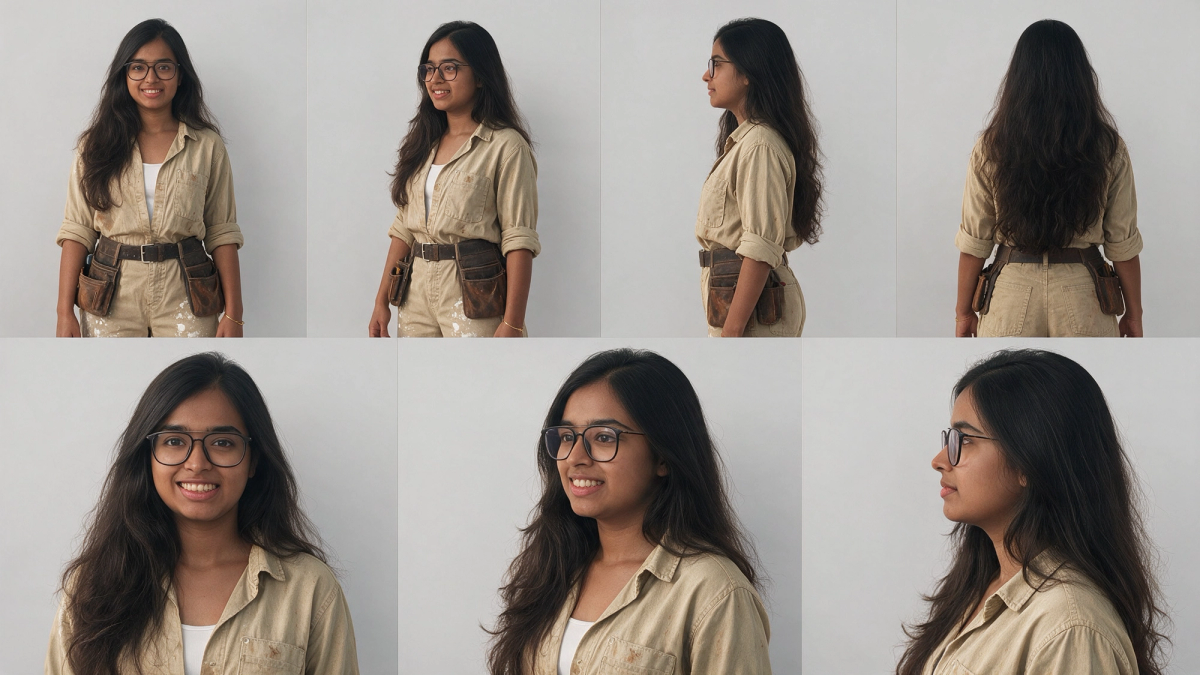
This is the prompt we ran in Seedream 5 Pro. Images 1 to 3 were photos of Riya and image 4 was an outfit reference. Swap in photos of your own character and your own outfit idea.
Create a character reference sheet.
IDENTITY - Images 1, 2 and 3 are the SAME real woman. Copy her face exactly as it appears in these photos: same face shape, eyes, nose, lips, smile, teeth, skin tone, eyebrows and proportions. Do NOT beautify, slim, age, lighten skin or change her features. Her face must look identical in every panel.
- Young Indian woman, early-to-mid 20s, round soft face, warm medium-brown skin
- Black thin rectangular eyeglasses (always on)
- Very long, voluminous, wavy dark-brown hair, middle parting, worn loose past the waist
- Small gold bangle on her right wrist
OUTFIT - Image 4 is for clothing ONLY. Ignore that model's face, hair and body entirely.
- Faded khaki/beige long-sleeve button-up work shirt, sleeves rolled to forearms, open collar with white tank top underneath, light brown dirt stains
- Matching khaki work trousers with white paint splatter
- Dark brown leather belt with brown leather tool pouches on both hips
- Dark worn knee pads
LAYOUT - plain light-grey studio background, soft even lighting, same scale in every view:
Top row: full-body turnaround, standing relaxed with arms at her sides - front, 3/4 front, side profile, back.
Bottom row: head-and-shoulders close-ups - front, 3/4, profile - all with the same face as the reference photos.
STYLE: photorealistic, natural skin texture, true-to-life, clean reference sheet with thin divider lines.
Negative prompt:
different face, face from image 4, ponytail, no glasses, lighter skin, slimmer face, beautified features, changed nose, changed smile, cartoon, inconsistent identity across panels
The storyboard and its prompt
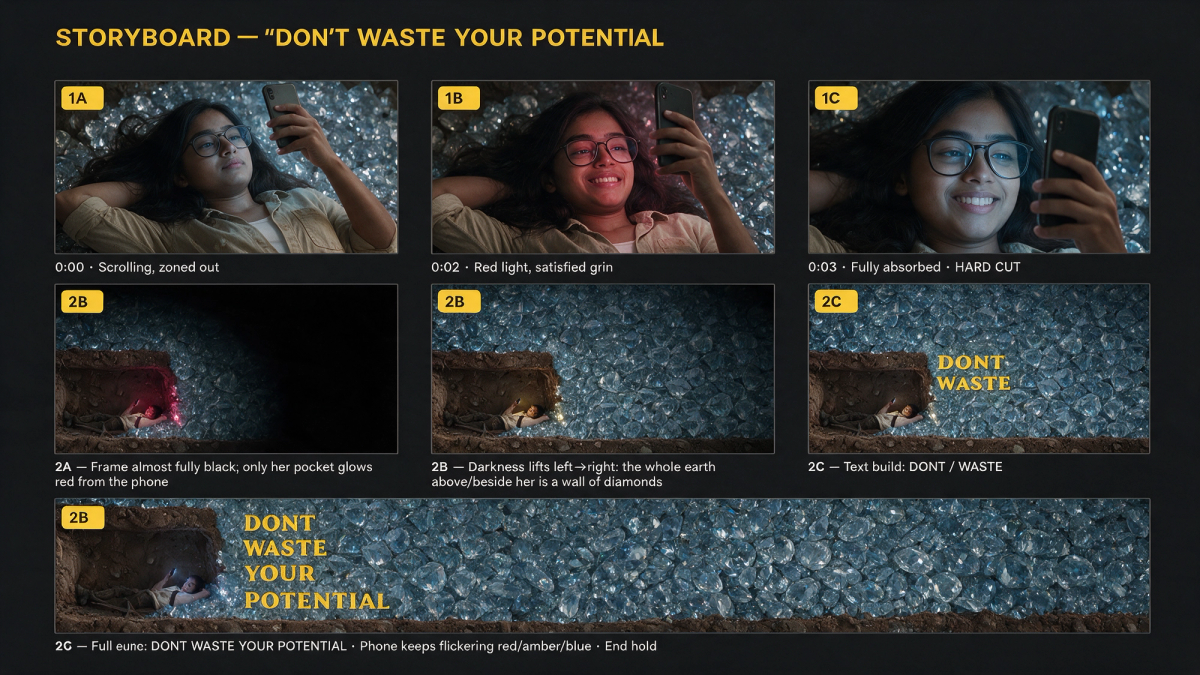
We made the storyboard in Seedream 5 Pro too, with the character sheet attached. The prompt below is the part saved with the image on Magnific. The remaining panels, 2B to 2D, show the darkness sweeping away, the diamond wall appearing and her still scrolling.
Use the attached character sheet as the ONLY person reference. She appears in all 7 panels.
Create a cinematic STORYBOARD SHEET, 16:9, dark charcoal background (#111111). 7 photoreal film-still panels in a 3-3-1 grid, each 16:9 with a thin grey border, a yellow (#F5C518) rounded tag top-left (1A, 1B, 1C, 2A, 2B, 2C, 2D) and a short white caption below. Title at top in bold yellow sans-serif: "STORYBOARD - DON'T WASTE YOUR POTENTIAL".
CHARACTER (identical in every panel, including the wide shots where she is small):
Young Indian woman, early 20s, warm brown skin, LONG dark-brown wavy hair, thin BLACK RECTANGULAR GLASSES, worn BEIGE/KHAKI utility shirt with rolled sleeves over a WHITE TANK TOP, BROWN LEATHER TOOL BELT with two pouches, khaki pants with white paint splatter, thin gold bracelet.
She is the only person in the storyboard. No boy, no man, no school uniform, no tie, no short hair.
LOOK: dark, moody, low-key, photoreal, film grain. Her phone screen is the only light source on her. Large clear cut diamonds everywhere.
SHOT 1 - top-down, she lies on her back on a bed of large clear diamonds, one arm behind her head, holding a smartphone above her face, long hair fanned over the diamonds.
1A - Medium close-up. Blank, zoned-out face. Cool blue phone light. Caption: "0:00 · Scrolling, zoned out"
1B - Tighter. Red/magenta phone light; lazy, satisfied grin behind her glasses. Caption: "0:02 · Red light, satisfied grin"
1C - Close-up of her face. Blue light, still smiling, phone reflected in her glasses. Caption: "0:03 · Fully absorbed · HARD CUT"
SHOT 2 - wide, side-on underground cross-section like an ant-farm cutaway. A small dug-out pocket of brown earth at bottom-left; inside it the SAME WOMAN (long wavy hair spread out, black glasses, beige khaki shirt, tool belt at her waist) lies on her back scrolling her phone. Static camera.
2A - Frame almost fully black; only her pocket glows red from the phone.
The full two-shot AI video prompt
Attach the character sheet as @Image1 and the first frame or storyboard as @Image2, then paste this into Seedance 2.5.
@Image1 = CHARACTER REFERENCE. Copy her identity exactly in every frame of both shots.
@Image2 = first frame of Shot 1.
8-second cinematic ad film, 16:9, 24fps, photoreal, dark and moody, film grain, smooth natural motion. Exactly TWO shots with ONE hard cut at 4 seconds. No other cuts, jumps or angle changes.
CHARACTER LOCK (must match @Image1 exactly):
- Face: fuller, softly rounded face, early 20s, warm medium-brown skin, soft friendly features
- Glasses: THICK, SQUARISH, BLACK full-rim frames
- Hair: long, voluminous, dark-brown, slightly wavy, side part, NO strands or bangs over the forehead
- Outfit: worn beige/khaki utility shirt with rolled sleeves, open over a white tank top; brown leather tool belt with two pouches; khaki pants with white paint splatter; thin gold bracelet
- NOT allowed: nose ring, face jewellery, round or thin metal glasses, curly bangs, a teenage-looking face, any other person
Keep a soft fill light on her face at all times so her features stay clearly visible and consistent.
[SHOT 1 - first 4 seconds - ONE CONTINUOUS UNBROKEN TAKE]
Top-down overhead view. She lies on her back on a bed of LARGE clear faceted diamonds, one arm tucked behind her head, holding a black smartphone above her face, long hair spread over the diamonds.
CAMERA: a single slow, steady, perfectly smooth dolly push-in from mid-torso to a close-up of her face, at one constant speed. Gimbal-smooth, no shake, no zoom jumps, no reframing, no cuts.
ACTION: her thumb scrolls slowly. Her blank, zoned-out expression gradually softens into a lazy, satisfied smile. Small, slow, continuous movements only.
LIGHT: her phone screen glow slowly fades from cool blue to soft red/magenta and back to blue, with gradual transitions only and no flashes. The glow reflects softly in her glasses.
HARD CUT.
[SHOT 2 - last 4 seconds - ONE CONTINUOUS TAKE, LOCKED-OFF CAMERA]
Wide, side-on underground cross-section like an ant-farm cutaway. A small dug-out pocket of brown earth sits at bottom-left; inside it the SAME woman from @Image1 (thick squarish black glasses, long side-parted hair, beige khaki shirt, white tank, tool belt) lies on her back scrolling her phone, small in the frame.
It opens almost fully dark, with only her pocket glowing red from the phone. The darkness then smoothly sweeps away from left to right over about one second, revealing that everything above and to the right of her pocket is a massive wall of sparkling blue-lit diamonds. She doesn't notice and keeps scrolling. The diamonds glint softly and the phone glow drifts between red, amber and blue until the end.
SOUND: low ambient drone, soft phone scroll taps, faint short-video audio from the phone in shot 1. At the cut, a deep bass hit, then a crystal shimmer on the reveal.
No text, no logos, no watermarks.
What is a hard cut? It is a straight jump from one shot to the next with no fade or transition. Asking for exactly one hard cut stops the model from adding extra cuts of its own.
How to make your own version
Step 1: Pick one contrast
Decide what the viewer sees first and what the reveal changes. Here it is a woman happy on her phone, then the treasure right next to her.
How to use it: write the contrast in one line before you write any shot.
Step 2: Give each shot one move and one action
Shot 1 is a slow push-in while she scrolls. Shot 2 is a locked camera while the light reveals the diamonds.
How to use it: say the camera move once, say the action once, and add "no cuts" inside each shot.
Step 3: Lock the character
Copy the character lock section and change the details to match your own character sheet.
How to use it: list what is not allowed too, such as other glasses or jewellery, because those are the first details to drift.
Common mistakes when writing a two-shot AI video prompt in 2026
- Asking for more than one cut in an 8-second clip.
- Changing the camera move halfway through a shot.
- Using sudden light flashes, which read as glitches instead of mood.
- Describing the character differently in each shot.
FAQ
How long should an AI video prompt be for an 8-second clip?
Long enough to lock the character and describe two shots clearly, usually 250 to 400 words. Most of the length goes into the character lock, not the action.
Can Seedance 2.5 do a reveal shot?
Yes. Describe the reveal as light changing in a locked frame, as this prompt does with the darkness sweeping from left to right, rather than as a camera move.
Do I need a storyboard for a two-shot video?
It helps, mainly for the wide shot where scale and placement go wrong. A first frame from the storyboard is often enough.
If you came here from the reel, comment on it and follow Riya, and the prompt will land in your DMs too.
In short: a two-shot AI video prompt gives the model one camera move and one action per shot, one hard cut, and a reveal done with light. Make a character sheet in Seedream 5 Pro, lay out the shots in a storyboard, and run the full prompt above in Seedance 2.5 on Magnific.
Quick summary · key points
- ✓The tools we used
- ✓Seedream 5 Pro on Magnific: the character sheet
- ✓A storyboard: the shot layout
- ✓Seedance 2.5 on Magnific: the video
- ✓The character sheet and its prompt
- ✓The storyboard and its prompt